To output specified text to the screen, use print() with a string inside the parentheses. For example, to print “hello, world”, use the following code:
>>> print('hello, world')The print() function can also accept multiple strings separated by commas, which will be concatenated into a single output:
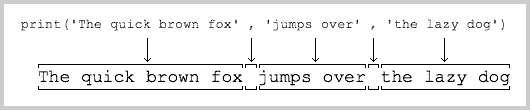
>>> print('The quick brown fox', 'jumps over', 'the lazy dog')
The quick brown fox jumps over the lazy dog
print() will print each string in sequence. When a comma is encountered, it outputs a space. Therefore, the output string is formed as follows:
print() can also print integers or calculation results:
>>> print(300)
300
>>> print(100 + 200)
300
We can also make the result of 100 + 200 look nicer when printed:
>>> print('100 + 200 =', 100 + 200)
100 + 200 = 300
Note that for 100 + 200, the Python interpreter automatically calculates the result as 300. However, '100 + 200 =' is a string, not a mathematical formula, so Python treats it as a string. Please explain the above printing result yourself.
Now you can use print() to output the results you want. But what if you want the user to input some characters from the computer? Python provides input(), which allows the user to enter a string and store it in a variable. For example, to input the user’s name:
>>> name = input()
Michael
When you enter name = input() and press Enter, the Python interactive command line waits for your input. At this point, you can enter any characters and press Enter to complete the input.
After inputting, there will be no prompt, and the Python interactive command line returns to the >>> state. Where did the content we just entered go? The answer is stored in the name variable. You can directly enter name to view the variable’s content:
>>> name
'Michael'
What is a variable? Please recall the basic algebraic knowledge learned in junior high school mathematics:
Let the side length of a square be a, then the area of the square is a x a. Treating the side length a as a variable allows us to calculate the area of the square based on the value of a. For example:
a = 2, then the area is a x a = 2 x 2 = 4;a = 3.5, then the area is a x a = 3.5 x 3.5 = 12.25.In computer programs, variables can be not only integers or floating-point numbers but also strings. Therefore, name as a variable is a string.
To print the content of the name variable, besides directly writing name and pressing Enter, you can also use the print() function:
>>> print(name)
Michael
With input and output, we can modify the previous program that printed ‘hello, world’ to make it more meaningful:
name = input()
print('hello,', name)
When running the above program, the first line of code will prompt the user to enter any characters as their name and store it in the name variable. The second line of code will greet the user with “hello” followed by their name. For example, if you input “Michael”:
C:\Workspace> python hello.py
Michael
hello, Michael
However, when the program runs, there is no prompt telling the user: “Hey, please enter your name”, which is unfriendly. Fortunately, input() allows you to display a string to prompt the user. So we modify the code to:
name = input('please enter your name: ')
print('hello,', name)
Running this program again, you will see that as soon as the program starts, it prints “please enter your name: “. Now the user can enter their name according to the prompt and receive the output “hello, xxx”:
C:\Workspace> python hello.py
please enter your name: Michael
hello, Michael
Each time the program runs, the output result will vary depending on the user’s input.
Input and output on the command line are that simple.
Any computer program is designed to perform a specific task. With input, users can tell the program the required information. With output, the program can inform the user of the task results after running.
Input is “Input”, and output is “Output”. Therefore, we collectively refer to input and output as “Input/Output”, or simply “IO”.
input() and print() are the most basic input and output methods on the command line. However, users can also complete input and output through other more advanced graphical interfaces. For example, entering your name in a text box on a web page and clicking “OK” to see the output information on the web page.
Exercise
Please use print() to output 1024 * 768 = xxx:
# TODO:
print(???)
#!/usr/bin/env python3
# -*- coding: utf-8 -*-

name = input()
print('Hello,', name)