When choosing between Thread and Process, Process should be preferred—it is more stable, and processes can be distributed across multiple machines, whereas threads are limited to multiple CPUs on a single machine at most.
Python’s multiprocessing module not only supports multiprocessing but also includes a managers submodule that enables distributing processes across multiple machines. A service process can act as a scheduler to distribute tasks to other processes via network communication. Thanks to the robust encapsulation of the managers module, you can easily write distributed multiprocess programs without needing to understand low-level network communication details.
For example: Suppose you already have a multiprocess program using Queue for communication running on a single machine. Now, due to heavy workload on the task-processing processes, you want to distribute the task-sending and task-processing processes across two machines. How to implement this with distributed processes?
The existing Queue can still be used, but by exposing it over the network via the managers module, processes on other machines can access it.
First, let’s look at the service process, which is responsible for starting the Queue, registering it on the network, and writing tasks to it:
# task_master.py

import random, time, queue
from multiprocessing.managers import BaseManager

# Queue for sending tasks:
task_queue = queue.Queue()
# Queue for receiving results:
result_queue = queue.Queue()

# QueueManager inherited from BaseManager:
class QueueManager(BaseManager):
    pass

# Register both Queues on the network, with the callable parameter linked to the Queue objects:
QueueManager.register('get_task_queue', callable=lambda: task_queue)
QueueManager.register('get_result_queue', callable=lambda: result_queue)

# Bind to port 5000 and set authentication key to 'abc':
manager = QueueManager(address=('', 5000), authkey=b'abc')
# Start the Queue manager:
manager.start()

# Get the Queue objects accessible via the network:
task = manager.get_task_queue()
result = manager.get_result_queue()

# Put some tasks into the queue:
for i in range(10):
    n = random.randint(0, 10000)
    print('Put task %d...' % n)
    task.put(n)

# Read results from the result queue:
print('Try get results...')
for i in range(10):
    r = result.get(timeout=10)
    print('Result: %s' % r)

# Shutdown the manager:
manager.shutdown()
print('master exit.')
Important Note: When writing multiprocess programs on a single machine, you can use the created Queue directly. However, in a distributed multiprocess environment, do not operate on the original task_queue directly when adding tasks—this bypasses the QueueManager encapsulation. You must add tasks through the Queue interface obtained via manager.get_task_queue().
Next, start the task process on another machine (or the same machine):
# task_worker.py

import time, sys, queue
from multiprocessing.managers import BaseManager

# Create a similar QueueManager:
class QueueManager(BaseManager):
    pass

# Since this QueueManager only retrieves Queues from the network, only provide names during registration:
QueueManager.register('get_task_queue')
QueueManager.register('get_result_queue')

# Connect to the server (the machine running task_master.py):
server_addr = '127.0.0.1'
print('Connect to server %s...' % server_addr)

# Ensure the port and authentication key match exactly with those set in task_master.py:
m = QueueManager(address=(server_addr, 5000), authkey=b'abc')
# Connect over the network:
m.connect()

# Get the Queue objects:
task = m.get_task_queue()
result = m.get_result_queue()

# Retrieve tasks from the task queue and write results to the result queue:
for i in range(10):
    try:
        n = task.get(timeout=1)
        print('run task %d * %d...' % (n, n))
        r = '%d * %d = %d' % (n, n, n*n)
        time.sleep(1)
        result.put(r)
    except queue.Empty:
        print('task queue is empty.')

# Processing complete:
print('worker exit.')
The task process connects to the service process over the network, so you need to specify the IP address of the service process.
Now, let’s test the functionality of the distributed processes. First, start the task_master.py service process:
$ python3 task_master.py
Put task 3411...
Put task 1605...
Put task 1398...
Put task 4729...
Put task 5300...
Put task 7471...
Put task 68...
Put task 4219...
Put task 339...
Put task 7866...
Try get results...
After sending all tasks, the task_master.py process waits for results in the result queue. Now start the task_worker.py process:
$ python3 task_worker.py
Connect to server 127.0.0.1...
run task 3411 * 3411...
run task 1605 * 1605...
run task 1398 * 1398...
run task 4729 * 4729...
run task 5300 * 5300...
run task 7471 * 7471...
run task 68 * 68...
run task 4219 * 4219...
run task 339 * 339...
run task 7866 * 7866...
worker exit.
Once the task_worker.py process finishes, the task_master.py process continues printing the results:
Result: 3411 * 3411 = 11634921
Result: 1605 * 1605 = 2576025
Result: 1398 * 1398 = 1954404
Result: 4729 * 4729 = 22363441
Result: 5300 * 5300 = 28090000
Result: 7471 * 7471 = 55815841
Result: 68 * 68 = 4624
Result: 4219 * 4219 = 17799961
Result: 339 * 339 = 114921
Result: 7866 * 7866 = 61873956
What is the use of this simple Master/Worker model? This is actually a simple but genuine distributed computing system. With minor code modifications, you can start multiple workers to distribute tasks across several or even dozens of machines. For example, replacing the code that calculates n*n with code that sends emails would implement asynchronous sending of email queues.
Where are the Queue objects stored? Notice that there is no code to create Queue in task_worker.py—the Queue objects are stored in the task_master.py process:
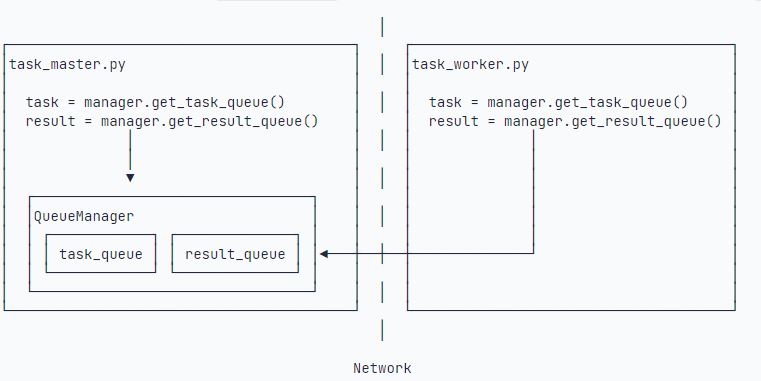
The Queue is accessible over the network thanks to QueueManager. Since QueueManager manages multiple Queues, each network call interface for a Queue must be given a unique name (e.g., get_task_queue).
What is the purpose of authkey? It ensures secure communication between the two machines and prevents malicious interference from other machines. If the authkey in task_worker.py does not match that in task_master.py, the connection will fail.
Python’s distributed process interface is simple and well-encapsulated, making it ideal for distributing heavy workloads across multiple machines.
Key Note: The Queue is used to pass tasks and receive results—keep the data volume of each task description as small as possible. For example, when sending a task to process a log file, do not send the hundreds-of-megabytes log file itself; instead, send the full path where the log file is stored, and let the Worker process read the file from shared disk storage.
#!/usr/bin/env python3
# -*- coding: utf-8 -*-

import random, time, queue
from multiprocessing.managers import BaseManager

task_queue = queue.Queue()

result_queue = queue.Queue()

class QueueManager(BaseManager):
    pass


QueueManager.register("get_task_queue", callable=lambda: task_queue)
QueueManager.register("get_result_queue", callable=lambda: result_queue)

manager = QueueManager(address=("", 5000), authkey=b"abc")

manager.start()

task = manager.get_task_queue()
result = manager.get_result_queue()

for i in range(10):
    n = random.randint(0, 10000)
    print("Put task %d..." % n)
    task.put(n)

print("Try get results...")
for i in range(10):
    r = result.get(timeout=10)
    print("Result: %s" % r)
# 鍏抽棴:
manager.shutdown()
print("master exit.")
#!/usr/bin/env python3
# -*- coding: utf-8 -*-
import time, sys
from multiprocessing.managers import BaseManager
# 鍒涘缓绫讳技鐨凲ueueManager:
class QueueManager(BaseManager):
pass
QueueManager.register("get_task_queue")
QueueManager.register("get_result_queue")
server_addr = "127.0.0.1"
print("Connect to server %s..." % server_addr)
m = QueueManager(address=(server_addr, 5000), authkey=b"abc")
m.connect()
task = m.get_task_queue()
result = m.get_result_queue()
for i in range(10):
try:
n = task.get(timeout=1)
print("run task %d * %d..." % (n, n))
r = "%d * %d = %d" % (n, n, n * n)
time.sleep(1)
result.put(r)
except Queue.Empty:
print("task queue is empty.")
print("worker exit.")